RGB Strip vs. Pixel Strip: Choosing the Right Controller to Avoid Rework
RGB Strip vs. Pixel Strip: Choosing the Right Controller to Avoid Rework
A Deep Dive for OEMs, Interior Designers, and Installers
Published: 2025-12-08
If you've ever plugged in an LED strip only to find it glowing with bizarre, inconsistent colors or with a dark, unlit section, you're not alone. In most cases, the problem isn't a faulty strip—it's a mismatch between the strip's type and its controller. This article provides a detailed, multi-dimensional analysis of this critical issue, offering a comprehensive guide to ensure your lighting projects are seamless from the start.
1. Understanding the Two Core "Families" of LED Strips
The first step to making the right choice is to understand the fundamental difference between the two main types of LED strips. They are not interchangeable, and using the wrong one with the wrong controller will lead to failure.
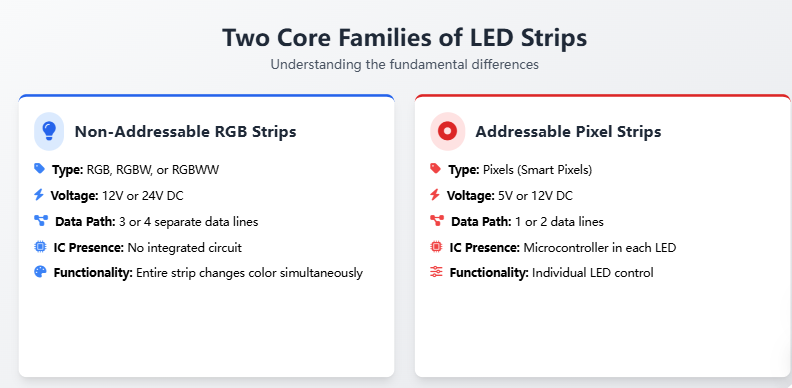 A. The Simpler, Non-Addressable RGB Strips
- Type: Common RGB, RGBW, or RGBWW.
- Voltage: Typically operates on 12V or 24V DC.
- Data Path: Features 3 or 4 separate data lines.
- IC Presence: The LED chips in the strip do not contain an integrated circuit (IC). They are controlled by the main controller, which sends a single signal to the entire strip.
- Functionality: The entire strip changes color simultaneously. You can't control individual LEDs or create dynamic effects like chasing or breathing patterns.
B. The Intelligent, Addressable Pixel Strips
- Type: Pixels, often referred to as "Smart Pixels."
- Voltage: Commonly 5V or 12V DC.
- Data Path: Features only 1 or 2 data lines. The controller sends a single data signal down the strip.
- IC Presence: Every single LED chip is embedded with a microcontroller (IC). This IC processes the incoming data and controls its own specific color and brightness.
- Functionality: This is the "smart" version. You can control each LED individually to create complex, dynamic effects like moving lights, video mapping, and synchronized animations.
2. The Crucial Rule of Compatibility: "Controller = Protocol"
The most critical mistake in LED lighting is assuming any controller can work with any strip. The controller's role is not just to provide power; it's to communicate with the strip's ICs. This communication is governed by a specific protocol, and the controller must "speak" the exact same language as the strip.
For Non-Addressable RGB Strips
These strips are simple. They require a 3-channel or 4-channel constant-voltage (CV) PWM controller. The controller's job is to send a variable voltage signal (PWM) to each of the 3 or 4 data lines. The PWM signal determines the brightness of the red, green, and blue LEDs (and white, if it's an RGBW strip). These controllers are typically rated for 5A to 30A per channel.
For Addressable Pixel Strips
This is where the complexity begins. You must use a dedicated "SPI Pixel Controller" that supports the specific IC protocol of your strip. The controller sends a digital data stream over a single line. Each pixel's IC decodes this stream and sets its own color. A controller for a WS2812B strip will not work with a TM1903 strip, and vice versa. The protocols are fundamentally different, with variations in data encoding, signal timing, and voltage levels.
3. A Detailed Protocol & IC Specification Guide
To choose the right controller, you need to know the technical specifications of your strip. The most common ICs used in addressable pixels are listed below with their key parameters. These codes often appear in factory datasheets and product specifications.
| IC Model | Voltage | Data Lines | Clock Frequency | Notes & Key Code |
|---|---|---|---|---|
WS2812B / WS2811 | 5V or 12V | 3 (RGB) | 800 kHz | One of the most popular. The 11 in WS2811 can sometimes be misread as 2811. WS2812 is very similar but includes an integrated driver transistor. |
SK6812 | 5V | 4 (RGBW) | 800 kHz | An update to WS2812 that adds a fourth channel for white light. The W is crucial for proper identification. |
SM16703 | 12V | 3 (RGB) | 800 kHz | A high-voltage alternative to WS2812B, often used in larger-scale installations or where higher power is required. |
TM1903 / UCS1903 | 12V | 3 (RGB) | 400 kHz | Requires a slower, 400 kHz controller. The 1903 code is a strong indicator of this protocol. The data lines and voltage are critical differentiators from higher-frequency models. |
GS8208 | 12V | 3 (RGB) | 800 kHz | Features a unique dual-channel backup system, making it highly reliable for applications like stage lighting where failures are unacceptable. |
4. The Perils of Ignoring the Basics: Voltage and Frequency
Using the wrong voltage or clock frequency is a guaranteed way to cause problems. It's not just about power; it's about signal integrity.
Scenario 1: Voltage Mismatch. Connecting a 5V WS2812B strip to a 12V SM16703 controller port is like sending a 5-pound package through a 12-pound delivery slot. The voltage is too high for the strip's ICs. The immediate result is often a spectacular "fireworks" effect of random, flickering pixels as the ICs are damaged by the excess power.
Scenario 2: Frequency Mismatch. A 400 kHz TM1903 strip requires a controller that can send data at 400 kHz. If you connect it to an 800 kHz-only controller, the data will arrive at twice the expected speed. The controller won't be able to read the signal correctly, and the entire strip will appear to be in a constant state of flash, glitching, or resetting. This is a common issue when a user tries to use a generic "pixel controller" without knowing the specific protocol.
5. The Role of Distance and Signal Amplification
Data transmission over long distances is not perfect. As a digital signal travels down the strip, it weakens. This is known as signal degradation. For 5V TTL signals (used by most addressable pixels), this effect is more pronounced than with 12V or 24V power lines.
- Rule of Thumb: If the distance from the controller to the first pixel is greater than 3 meters, you should consider adding a TTL Signal Amplifier or repositioning the controller to be closer to the strip.
- Signal vs. Power: It's a common mistake to think that extending the power wire (which is a low-frequency DC signal) will help with the data signal. This is not the case. The power wire carries the 5V or 12V, while the data wire carries a high-speed, low-voltage signal that is susceptible to interference and attenuation. Amplifiers are specifically designed to boost this delicate digital signal.
Ready to Get Specific?
Still unsure about the right controller for your project? The comments section is open. Simply provide the IC code and voltage from your strip's specification sheet, and I'll provide a direct recommendation for a compatible controller. We have versions exported to over 73 countries, and our advice is strictly based on technical parameters, not sales pitches.
© 2025. This article is intended for informational purposes. Always consult the manufacturer's specifications for your specific components.
Tags: #LEDControllers #PixelStrips #RGBvsPixel #LightingDesign #LightingIndustry #LEDStrips #ArchitecturalLighting #OEM #InteriorDesign #Installation